 Simply BP
Export Blood Pressure from Apple Health to a PDF
By Simply BP ·
This article is about keeping records, not medical advice. Talk to your doctor about your own readings.
If your blood pressure readings live in Apple Health, getting them in front of your doctor sounds like it should take one tap. It usually doesn't. This article explains what Apple Health's own export gives you, why it isn't something to hand to a doctor, and how to turn the same readings into a short PDF report with Simply BP, step by step. If you'd rather work on paper, there's a free printable summary sheet further down.
What Apple Health's own export gives you
The Health app can export your data: tap your profile picture in the top-right corner of the Health app, scroll down and choose Export All Health Data. After a while it hands you a file called export.zip. Inside is your entire health history as XML, a format made for software rather than for people. It holds every step count, every heart-rate sample and everything else the Health app has stored, often years of it, in one long file.
That's useful as a backup or for moving data between apps. It isn't something a doctor can open between two appointments and read. There's no chart, no average and no table of your blood pressure readings, just raw records. What helps at an appointment is the opposite: a page or two showing your readings for a chosen period, with the numbers a doctor usually looks at first.
The idea: bring the readings into a diary, then print the diary
Simply BP is a blood pressure diary for iPhone that can read your blood pressure readings from Apple Health and save its own readings there. Once the readings are in the diary, it can make a doctor report: a PDF with a one-page summary on top, a chart, and a table of every reading in the period. It works with readings from any source that writes blood pressure to Apple Health, such as the app of a smart cuff, and with readings you type in yourself.
Step 1: Turn on Apple Health in Simply BP
Open Simply BP, go to Settings and find the Apple Health section. Turn on Sync with Apple Health. iOS then asks which data Simply BP may read and write: blood pressure and heart rate. Allow both, otherwise there's nothing to bring in.
If nothing comes in later, the permission is the first thing to check: it lives in the iOS Settings app under Health, Data Access & Devices, Simply BP.
Step 2: Let your readings come in
As soon as the switch is on, Simply BP brings in the blood pressure readings Apple Health holds from the last five years and saves the readings you typed in Simply BP to Apple Health, so both places hold the same history. A short message tells you how many readings came in and how many were saved.
After that it keeps up by itself: each time you open the app, new readings from Apple Health come in. There's also a Sync Now button under the switch if you want to bring them in right away. The pulse comes along too: when your cuff saves a heart rate within two minutes of the reading, Simply BP shows it next to the numbers.
Step 3: Check what came in
Your readings now appear in the history, one day at a time. A reading that came from another app keeps its numbers as that app recorded them: its edit screen says it came from Apple Health, and to correct the numbers you edit them in the app that recorded them. Readings you type in Simply BP are saved to Apple Health as typed entries, together with the arm, position, tags and notes, so they come back with everything on a new iPhone.
Step 4: Create the doctor report
On the Home screen, tap Doctor Report at the top right (it's also on the Statistics screen). Then:
- Pick the period: 7D, 30D, 90D, 1Y or All. The screen shows how many readings fall into it, under Readings in this period.
- If you like, type Your name (optional). It appears at the top of the report.
- Tap Create PDF Report. A preview opens, and from there you can print the report, save it to Files or send it by email or message.
The doctor report is part of Simply BP Pro, a one-time purchase with no subscription. Without Pro, the button shows a small lock and opens the Pro screen. Logging, history and Apple Health sync are free.
What's in the report
The first page is a summary built on daily averages, so a day with five readings counts as much as a day with one:
- the period of the report, your name and the date it was made;
- when you make the report from the result screen of the 7-day home check (Create Report for Your Doctor), the home average with its morning and evening values;
- the average of your readings and the average pulse, with how many readings it covers and on how many days;
- the highest and lowest reading, each with its date and time;
- the morning average (before noon) and the evening average (after 6 PM);
- the difference between your right and left arm, when you have readings from both;
- a chart of the period, followed by a table of every reading with its date, time, numbers, pulse, arm, position and notes.
Each reading is named by the guideline table you chose in the app (ACC/AHA, ESH or JSH), and every page ends with a reminder to talk to your doctor about these readings. The report doesn't interpret anything for you; it lays the readings out so your doctor can.
Paper size
The report comes out on US Letter in the United States, Canada, Mexico and a few other countries that use it, and on A4 everywhere else, based on your iPhone's region. That way it fits the printer at your doctor's office without shrinking.
Readings for a parent or partner
If you keep readings for someone else in Simply BP (People, also part of Pro), their readings stay in the app and never go to your Apple Health: only your own readings are synced. A report made while their name is selected carries their name at the top instead of yours.
Prefer paper?
If you don't use an iPhone app at all, our free one-page summary covers the same ground on paper: the period, the number of readings, the morning, evening and overall averages, the pulse, your cuff, your current medications and your questions for the doctor.
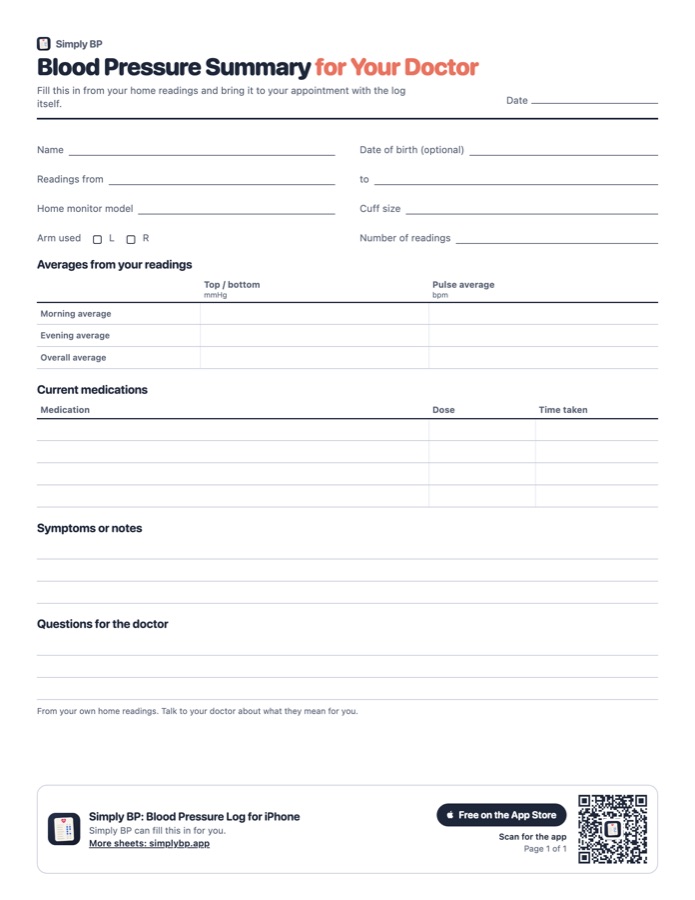
Blood Pressure Summary for Your Doctor
One page to bring to an appointment: your averages, medications, symptoms and questions.
Download the doctor summary (PDF)The same log on your iPhone, with a PDF report for your doctor.
Coming soon to the App StoreAt the appointment
Whichever way you go, bring the whole record, not just the average. Published guidance on home readings from the American Heart Association, the American Medical Association and the European Society of Hypertension treats them as one more source of information for your doctor, who decides what they mean for you. For how to take the readings themselves, see how to measure blood pressure at home.
When it's available
Simply BP isn't on the App Store yet. It's coming soon: see when it's out. Until then, the printable blood pressure logs are free to use.
Sources
- Shimbo D, et al. Self-Measured Blood Pressure Monitoring at Home: A Joint Policy Statement From the American Heart Association and American Medical Association. Circulation. 2020;142(4):e42–e63. https://doi.org/10.1161/CIR.0000000000000803
- Mancia G, et al. 2023 ESH Guidelines for the management of arterial hypertension. J Hypertens. 2023;41(12):1874–2071. https://doi.org/10.1097/HJH.0000000000003480
This article is about keeping records, not medical advice. Talk to your doctor about your own readings.